
Playback Decisions
Every time a title starts, Sovereign walks the same fixed sequence of steps to decide whether to send the file as it is (Direct Play), repackage it with some audio converted (Remux), or re-encode the video (Transcode). Its checks don’t all fall the same way when they have nothing to go on: some let the copy through, and some refuse it.
Read the chart from left to right, in three columns: Inputs, Can the source be copied? and Transcode plan. The boxes plan something, the six hexagons are the gates that can refuse to copy the video, the two dashed shapes are answers Sovereign takes from your license, and the two rounded ends are the only ways out. Sovereign walks it on every start, including the new start a seek makes, and the decision holds for that stream until it ends.
The route always passes through the inputs and all six gates. It ends at Copy when every gate lets the video through. When any gate refuses, it follows the arrow marked “refused” through the transcode plan to Transcode. The Transcoding page covers what the three outcomes cost and what each reason means; this page is about how Sovereign gets to one.
Inputs
Section titled “Inputs”The first column runs for every play, whether it ends in a copy or not.
- Hardware transcoding and HDR tone-mapping - whether a transcode may use the GPU, and whether an HDR source may be tone-mapped. Sovereign decides both itself, and the client has no say. Every server has both today, licensed or not, so on your server these two pass.
- Client capabilities - what the device said it can do when it asked to play: the codecs it decodes and at what bit depth and resolution, the dynamic ranges its display shows, how much video it can buffer, and any frame-size alignment its decoder needs. A device has to describe all of it, or the start is refused before any of this runs, so no step below ever guesses on a device’s behalf.
- Output codec - the codec a transcode would produce. It’s H.264 unless the source is larger than the device decodes in H.264 and the device takes the full frame in H.265 or AV1, and your GPU can encode that codec. It’s settled first because the frame size and the bitrate cap are worked out for it, even on a play that ends up copied.
- Audio - one decision per audio track: copied when the device decodes its format, otherwise converted to the best format the device named (E-AC-3, then AC-3, then AAC). It’s marked as failed in the chart when any track is converted, and that’s what turns a copy into a Remux. It never stops the video from being copied.
- Frame size - the frame a transcode would use: scaled down to the largest size the device decodes in the output codec, and padded where its decoder needs an aligned size. On a play that ends in a copy it’s shown as skipped, since nothing is resized. On a transcode it’s marked as failed where the picture was scaled down, which is the one change here a viewer would notice.
Can the Source Be Copied?
Section titled “Can the Source Be Copied?”The second column is the six gates, then Copy, the first of the two exits. Each gate compares one property of the source with what the device said it can handle. Sovereign evaluates all six on every play, even after one has refused, so a play that fails two gates reports both.
- Codec - the source’s video codec can be carried in the format Sovereign streams (H.264, H.265, VP9 or AV1), and the device decodes it at the source’s bit depth or higher. A 10-bit file sent to a device that only decodes 8-bit is refused here.
- Dolby Vision - a source without Dolby Vision passes. One with it passes only when the picture underneath its Dolby Vision data is a standard one an ordinary decoder shows correctly. Profile 5 never passes, whatever the device.
- Video range - the source’s dynamic range (SDR, HLG or PQ) is one the device’s display can show.
- Resolution - the source fits within the largest frame the device decodes in the source’s codec, and its dimensions meet any alignment the device’s decoder requires.
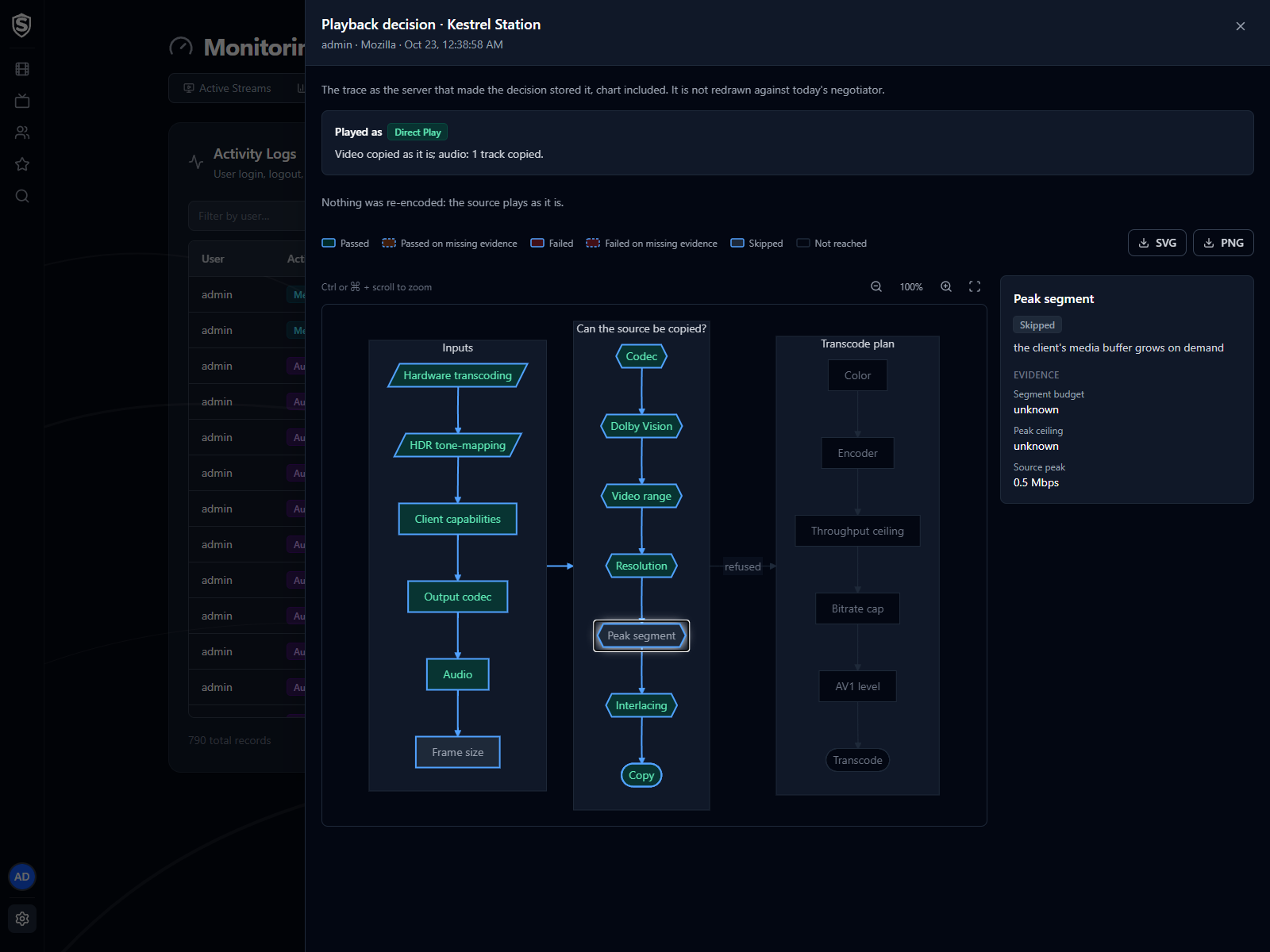
- Peak segment - the heaviest stretch of the source fits in the device’s media buffer. Sovereign tries shorter segments before giving up on a copy, so this refuses only when even the shortest doesn’t fit. A device whose buffer grows as it needs to can’t overflow it, so for one of those, such as the web app in a browser, this gate is skipped.
- Interlacing - the source is progressive. An interlaced source is never copied.
When a misaligned frame or an oversized peak is reported alongside another cause, it’s marked as minor: the transcode that the other cause forces corrects it anyway.
When the Evidence Is Missing
Section titled “When the Evidence Is Missing”Sometimes a gate has nothing to compare: the library never recorded the frame size, the file’s peak couldn’t be measured, the file doesn’t say whether it’s interlaced. Each gate then falls one way or the other, and they don’t all fall the same way. A gate that fails open lets the copy through when it can’t tell. One that fails closed refuses the copy and transcodes instead.
| Gate | Missing Evidence | Falls | Why |
|---|---|---|---|
| Codec | The source’s codec was never identified | Closed | A copy of a codec nobody identified can’t be shown to play |
| Dolby Vision | The file doesn’t say what its base picture is | Closed | An unrecognised base picture is itself the warning sign: copied, Profile 5 shows in green and purple |
| Video range | Never missing | (none) | Every device names the ranges its display shows, or its start is refused |
| Resolution | The source’s dimensions are unknown | Closed, but only for a device that requires aligned frames | A device that needs alignment refuses a stream it can’t decode, so an unverified size is re-encoded. An unknown size is never said to exceed the device’s limit |
| Peak segment | The source’s peak couldn’t be measured | Open | Not measuring isn’t evidence of an oversized file, and refusing would transcode every file Sovereign couldn’t measure |
| Interlacing | The file doesn’t say how it’s scanned | Open | It’s read as progressive, so the copy goes ahead |
The difference is deliberate. A gate fails closed where a wrong copy would fail badly and silently, with a broken picture and no error to explain it. It fails open where a wrong copy is rare and refusing would cost a transcode on files that are almost always fine.
The chart in the admin views shows which way it went: a step decided on missing evidence has a dashed outline, and the legend reads Passed on missing evidence or Failed on missing evidence.
When all six gates pass, the route ends at Copy, the last step of the second column, and the video is copied. The play is a Direct Play if every audio track was copied as well, and a Remux if any was converted. A copy carries the source’s own bitrate and picture untouched, so the third column doesn’t apply.
When any gate refused, the route follows the arrow marked “refused” into the transcode plan.
Transcode Plan
Section titled “Transcode Plan”The third column only runs when the video has to be re-encoded.
- Color - what happens to an HDR source. Sovereign keeps it in HDR only when every condition holds: the display shows that range, the output codec is H.265 or AV1, the device decodes that codec at 10 bits, and your GPU passed a 10-bit encode test at startup. Each of these fails closed, so if any is missing the picture is tone-mapped to SDR, which is also what always happens to Dolby Vision Profile 5. A wide-colour SDR source is converted to standard colour, and an ordinary SDR source skips this step.
- Encoder - the encoder that runs. Sovereign prefers a GPU (NVIDIA, then Intel Quick Sync, then VAAPI), decoding on the GPU too where it can, and falls back to the processor for H.264. An encoder that failed to start earlier, since the server last started, is passed over. See Hardware Acceleration.
- Throughput ceiling - two tone-mapping routes can’t keep up with a 4K picture in real time: tone-mapping on the processor, and Dolby Vision Profile 5 on an Intel GPU. On those, the output is held to 1080p so playback doesn’t stall. Any output of 1080 lines or fewer skips this step.
- Bitrate cap - the most the transcode may spend: your server’s ceiling, lowered by the viewer’s own limit or by the bitrate the device said it can take, whichever is lowest. See Video Quality.
- AV1 level - for an AV1 transcode, the level the stream is signalled at, worked out from its frame size, frame rate and bitrate. Skipped for H.264 and H.265.
Transcode is the second exit. The stream that comes out is re-encoded video, with each audio track copied or converted as the Audio step decided.
Seeing a Real Play’s Route
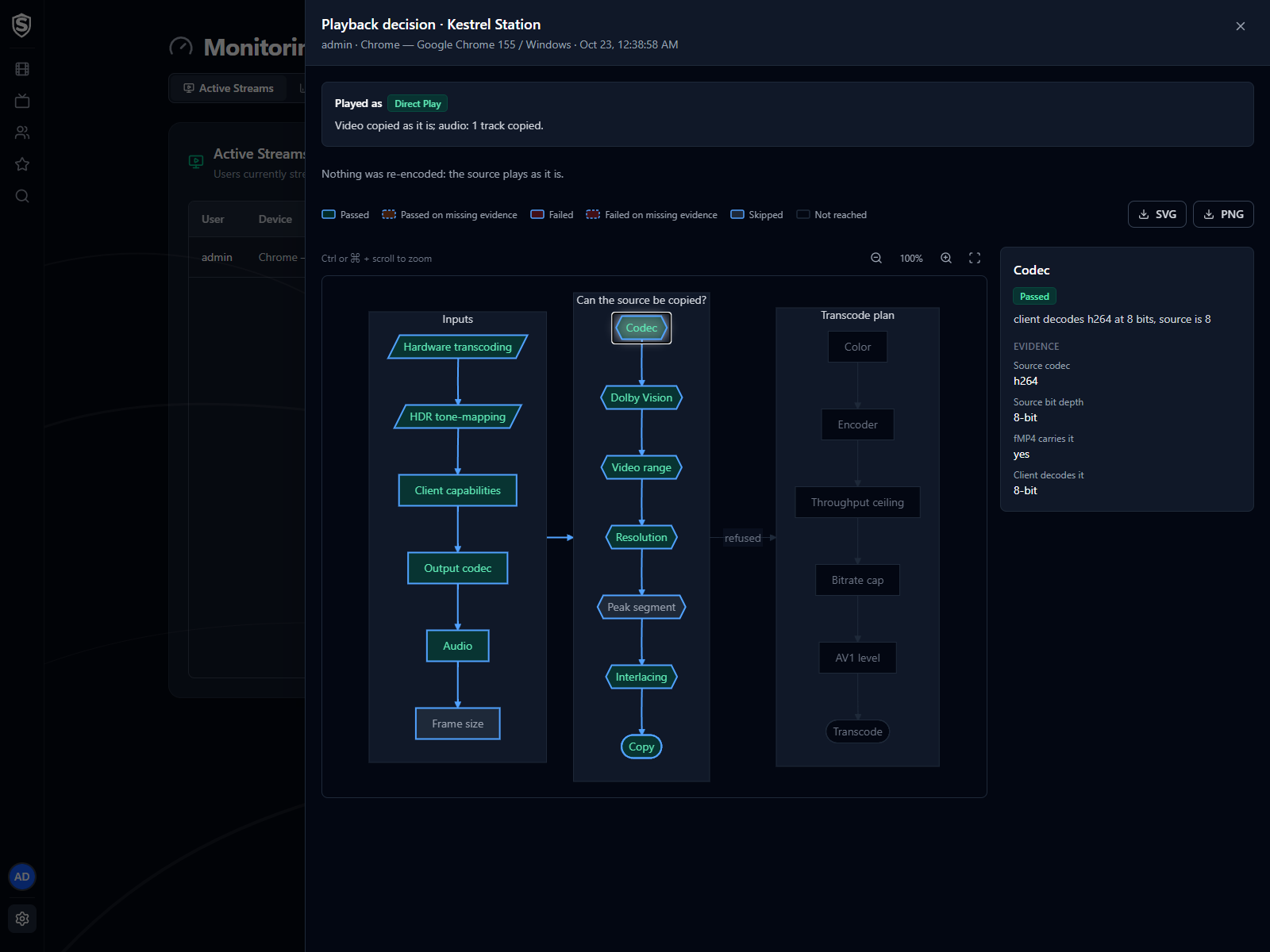
Section titled “Seeing a Real Play’s Route”Three admin pages draw this chart for a real play, in a panel called the playback decision, with the route it took lit up and every step coloured by what it decided. Each opens with a headline: the mode, then one line saying what happened to the video and the audio (“Played as Direct Play · Video copied as it is; audio: 1 track copied.”). The reasons follow in plain words, then the chart.
Click a step to see what it compared, with the values on both sides. The buttons above the chart, or Ctrl (⌘ on a Mac) with the scroll wheel, zoom in and out, and the last button fits the whole chart back into the pane. SVG and PNG save the chart as shown.
Active Streams
Section titled “Active Streams”Every stream in Monitoring > Active Streams has the Playback decision icon (a question mark) beside its mode. It opens the playback decision for that stream while it plays.
Activity Logs
Section titled “Activity Logs”A play’s entry in Monitoring > Activity Logs has the same Playback decision icon, so you can look at a play after it has finished. The route is the one stored when the play started, drawn as the server that made the decision drew it. After an update that changes these steps, an older play still shows the steps it really took.
Playback Simulator
Section titled “Playback Simulator”Library > Playback Simulator answers the question before anyone presses play: would this device direct play this title? Pick a title, a device, and optionally a bitrate limit, a video quality and an audio language, and it shows the mode and route a start would take, without starting a stream. Its headline reads Predicted rather than Played as. The Playback Simulator page describes its controls.
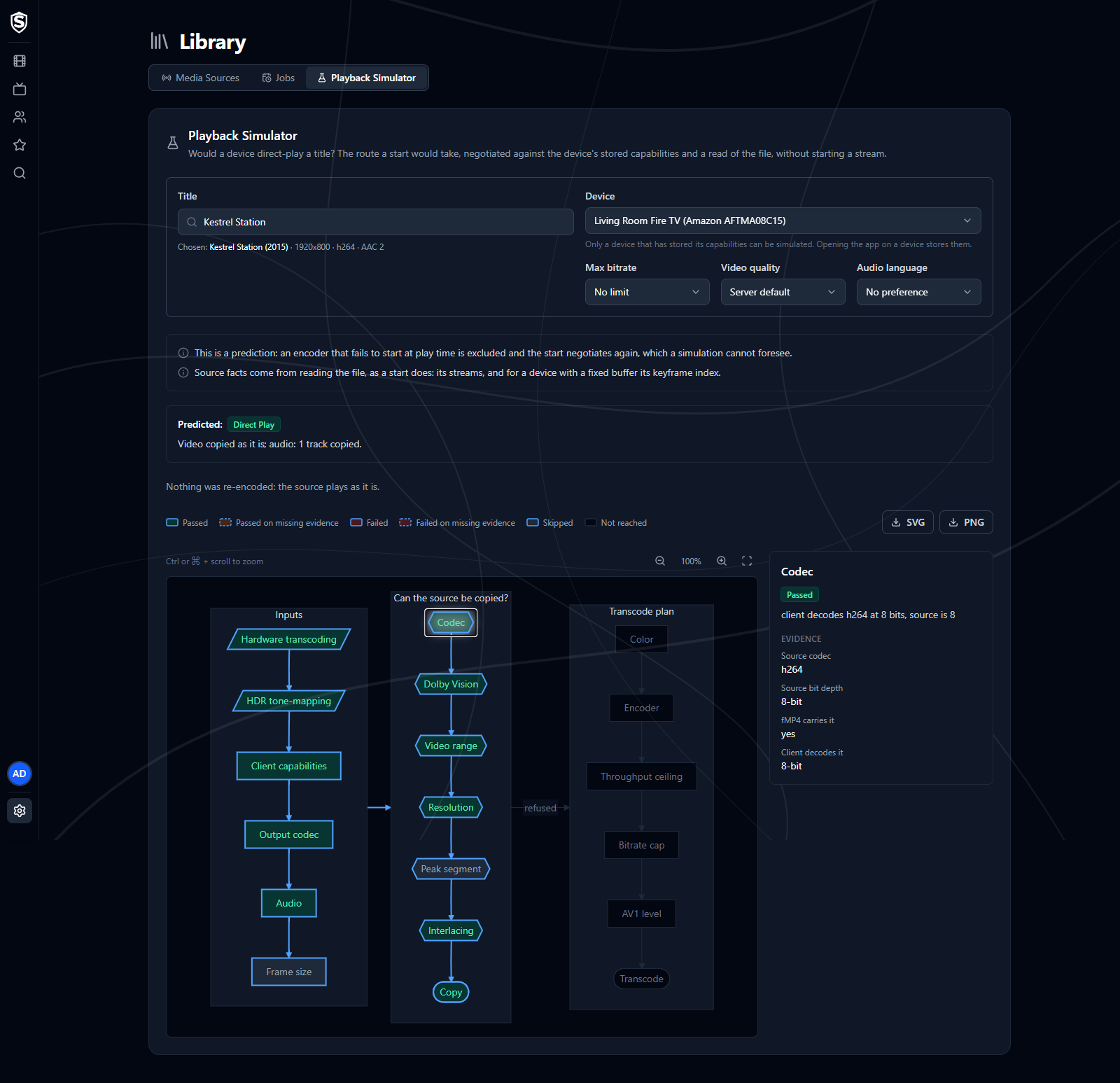
Only a device that has told the server what it can play can be simulated, and opening the app on a device is what does that. The simulator then reads the file the way a start would: its streams, and for a device with a fixed buffer, how heavy its segments get. So it predicts from the same facts a real play would use. It never transcodes anything, and asking about the same file again within five minutes reuses the read.
The answer is still a prediction, and the page lists what it’s based on. Two things can still make it differ from a real play. An encoder that fails to start at play time is set aside and the start tries again, which the simulator can’t foresee. And if the file’s storage doesn’t answer in time, the simulator falls back to the library’s record of the file, and its notes say so. A stalled network mount shows up this way.
Titles, artwork, people and descriptions shown in screenshots are fictional and were created for illustration. Sovereign doesn't include or supply any media: it plays the library you bring.