
Home
The Home screen is your landing spot after the channel starts. It shows what’s new and what you’re in the middle of watching.
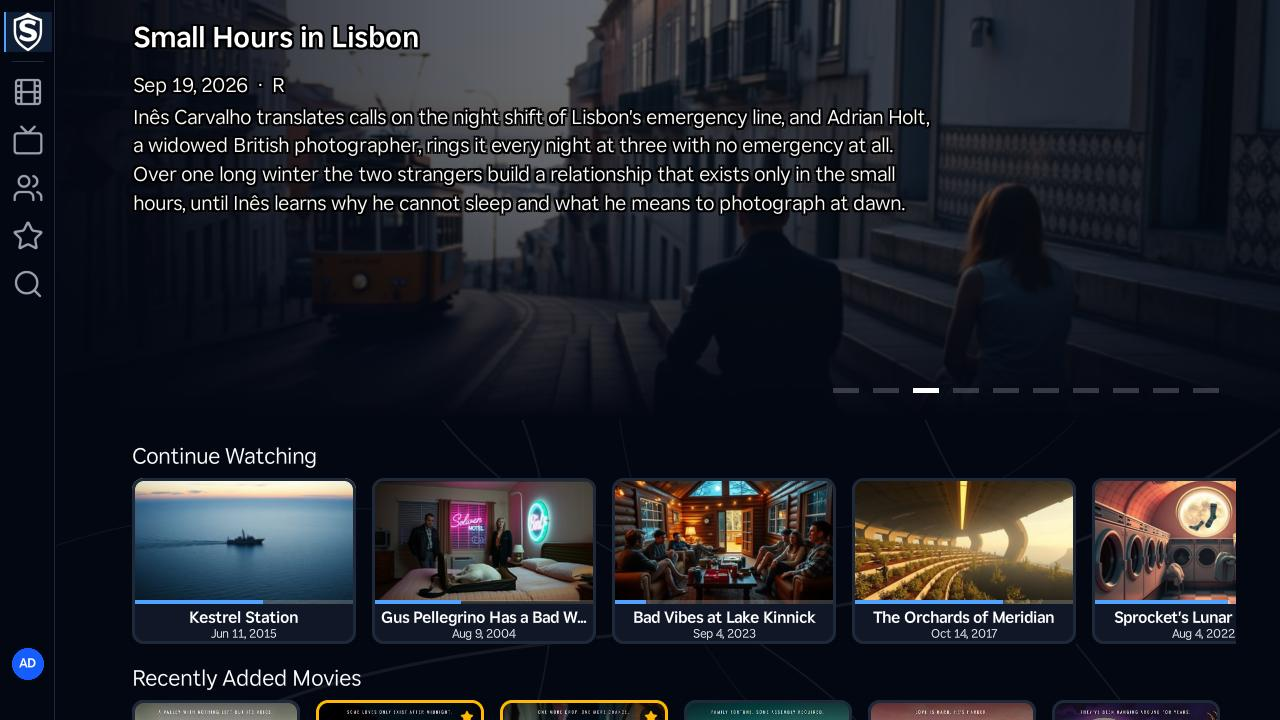
Hero Carousel
Section titled “Hero Carousel”The top band spotlights the most popular movies in your library, rotating through them automatically. Each slide shows the title’s backdrop, release date, content rating, and a short synopsis; press OK while the hero is focused to open the title’s details page, or use Left and Right to browse the other slides.
Continue Watching
Section titled “Continue Watching”Titles you’ve started appear here with a progress bar under each card. Once preview thumbnails exist for a title, its card shows the frame you stopped on rather than the usual artwork. Pressing OK on a card resumes playback immediately in the video player, right where you left off, without stopping at the details page.
Recently Added Movies and New Episodes
Section titled “Recently Added Movies and New Episodes”Below that, two scrolling rows show the movies most recently added to the library and the episodes that aired most recently. Press OK on any card to open its details page.
Titles, artwork, people and descriptions shown in screenshots are fictional and were created for illustration. Sovereign doesn't include or supply any media: it plays the library you bring.