
Account
The Account screen opens from your avatar at the foot of the rail. It covers your profile and preferences on the device.
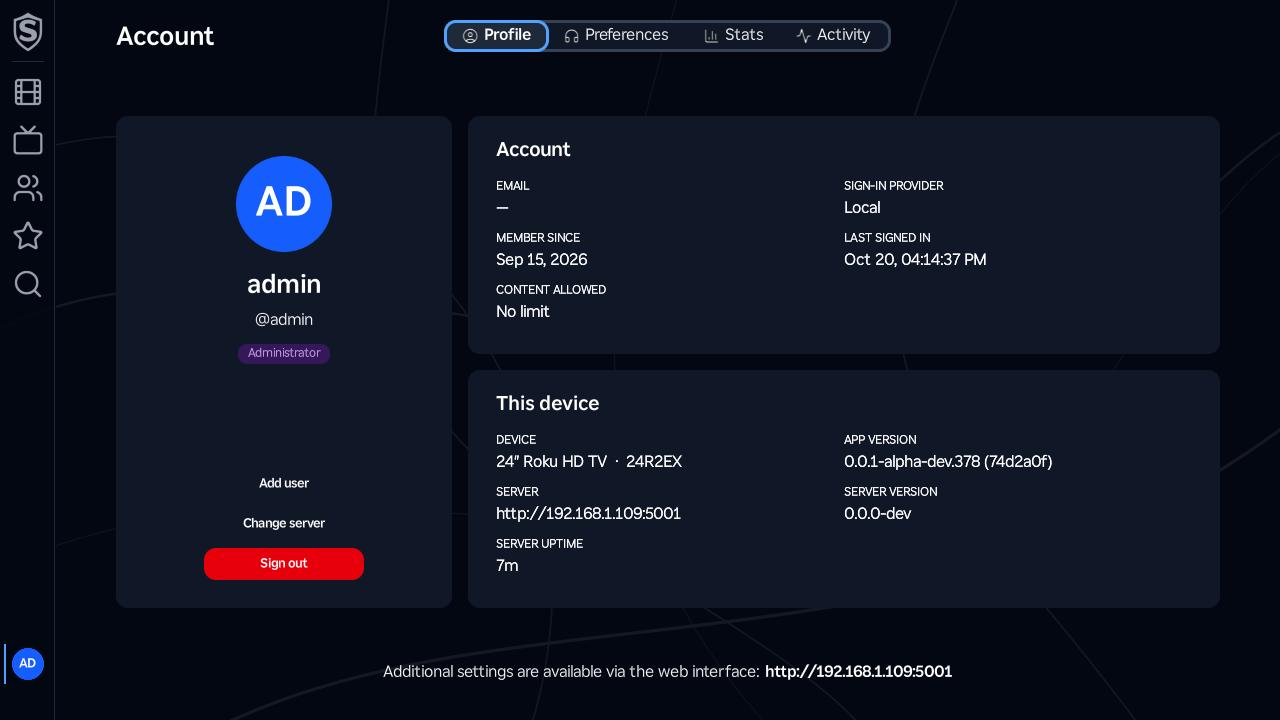
The tabs across the top switch between the panes:
- Profile - your avatar, name, username and role, with Switch user (when two or more people are signed in), Add user, Change server and Sign out beneath them, beside two cards. Account lists your email, how you sign in, when you joined, when you last signed in and what your account is allowed to watch. This device names the Roku and shows the channel’s version, the server you’re connected to, and that server’s version and how long it’s been running. Each version comes with its commit, so these are the details to include when you report a problem.
- Preferences - audio language, subtitle language, maximum video quality, video quality and Autoplay next episode, the same playback settings your account has on the web. Each change saves as you make it. The language and quality settings apply from the next stream you start, and OK on Autoplay next episode switches it on or off.
- Stats - your viewing figures: headline totals such as plays and watch time over the last 30 days, most-watched titles, plays by genre, movies against episodes, how far you get through what you start, direct play against transcode, and a day-by-hour heatmap of when you watch, shown in the device’s local time.
- Activity - a table of your account’s recent activity.
Everything else about your account is on the web, and the bottom of the Profile tab shows your server’s address as a reminder. Your display name, email, profile picture and password, downloading your data and deleting your account are all in User Settings.
Sign out signs out only you. Change server moves the channel to a different server without signing anyone out, and Add user and Switch user are for the other people in the house: More Than One Person on a TV covers all three, and the five-person limit.
Titles, artwork, people and descriptions shown in screenshots are fictional and were created for illustration. Sovereign doesn't include or supply any media: it plays the library you bring.