
Movie Details
The Movie Details screen shows everything Sovereign knows about a title, and it’s where playback starts.
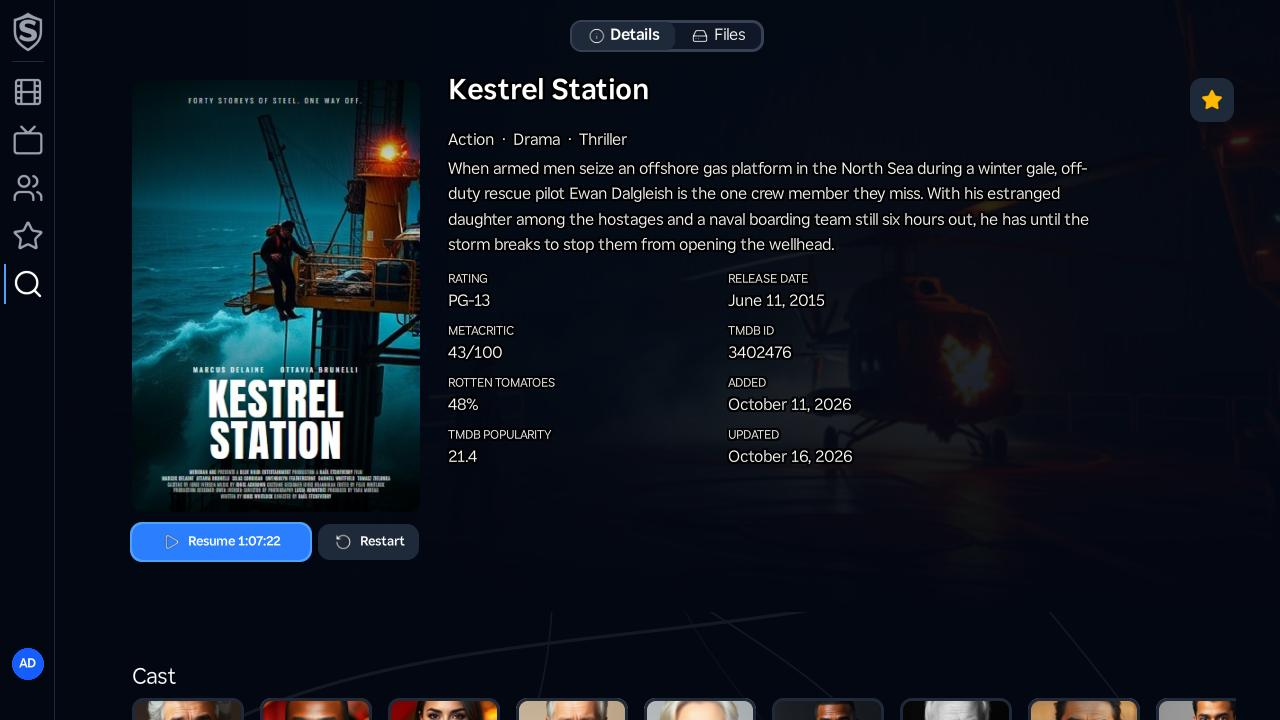
Details Tab
Section titled “Details Tab”- Play / Resume - the primary button starts playback in the video player. Once you’ve watched part of the title it reads Resume with your timecode, and a Restart button appears beside it to start over.
- Favorite - the star in the top-right corner adds or removes the movie from your Favorites.
- Genres - the movie’s genres, listed under the title.
- Metadata - the rating, release date, critic scores, and library dates, alongside the synopsis.
- Cast - press Down to scroll to the Cast row, directors first, and a More Like This row of related titles below it. Press OK on anyone in the cast row to open their page, with their acting and directing credits.
Files Tab
Section titled “Files Tab”The Files tab lists each video file available for the movie, with the resolution, codec, dynamic range, audio, and size that tell two files apart. Press OK on a file to play that specific one, rather than letting Sovereign pick.
© 2026 Sovereign Media LLCdocs/v1.0.5@98b57ac305fc
Titles, artwork, people and descriptions shown in screenshots are fictional and were created for illustration. Sovereign doesn't include or supply any media: it plays the library you bring.