
Admin: GPU Capabilities
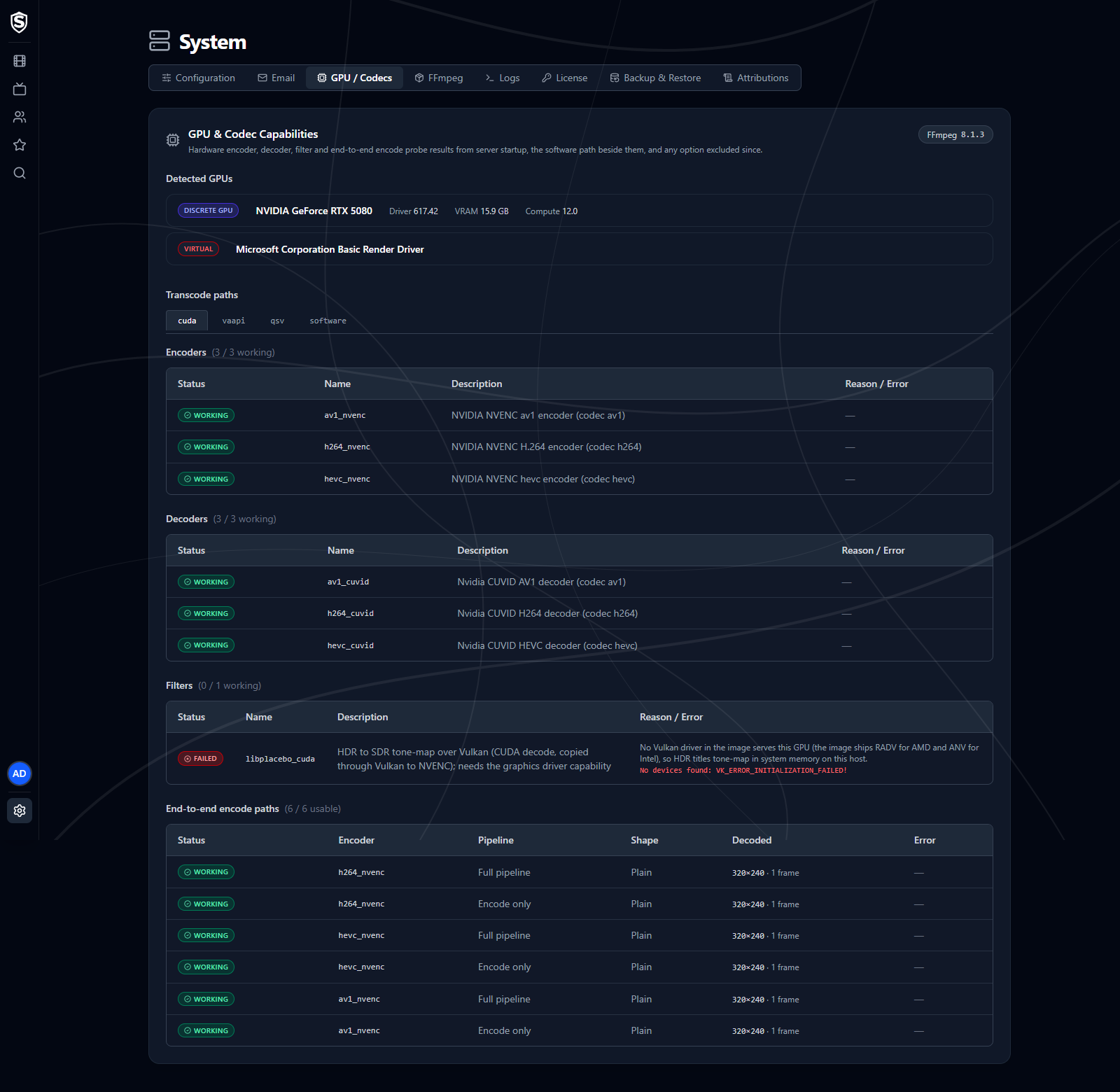
The GPU Capabilities page (GPU / Codecs in the admin menu) reports the results of the hardware-acceleration probe that runs at server startup: which encoders, decoders and filters your GPU can run, which complete encode paths work end to end, and the software path a transcode falls back to.
Excluded Encode Options
Section titled “Excluded Encode Options”An encode option can pass the startup probe and still fail to start a real transcode later. When that happens Sovereign stops choosing it, and sessions fall back to the next option, which may be slower or lower quality. A warning at the top of the page lists each excluded option with its encoder, pipeline, shape, error, and when it was excluded. Restarting the server probes them again. When nothing has been excluded, the warning isn’t shown.
Detected GPUs
Section titled “Detected GPUs”Every GPU visible to the server, tagged as discrete, integrated, or virtual, with driver version, VRAM, and compute capability where applicable. Virtual devices are never used for transcoding.
Transcode Paths
Section titled “Transcode Paths”One tab for each acceleration API FFmpeg reports (such as CUDA, VAAPI or QSV), then a software tab. The FFmpeg version beside the page heading links to the FFmpeg page.
Each API tab lists its encoders, its decoders and the GPU filters the transcode pipelines use, each with a count of how many work, and each with a status badge:
- Working - probed successfully on this host.
- Not Tested - the probe didn’t exercise this decoder or filter.
- Failed - the probe failed. The reason or error message sits beside it.
Below them, End-to-end encode paths runs each encoder the way a real session would, through its filters and the muxer and then decoded back, for each pipeline (Software, Encode only, or Full pipeline with hardware decode too) and shape (Plain, Scale, or HDR tone-map). A path reads Working, Failed, or Excluded when it passed at startup but has failed a session since. Only paths that work here are ever chosen, however well their encoder and filters did on their own. A tab with no paths says why: the probe didn’t run, or none of that API’s encoders passed.
The software tab covers what a transcode runs in system memory when no hardware path serves it. It lists each software encoder and filter the pipelines use, whether the shipped FFmpeg includes it (Available, Missing, or Not Checked), what it’s needed for, and whether a missing one makes that feature fail or falls back to the next option.
If a codec you expect is missing or failing, see the Hardware Acceleration guides for driver and container setup.
Titles, artwork, people and descriptions shown in screenshots are fictional and were created for illustration. Sovereign doesn't include or supply any media: it plays the library you bring.