
Licensing
Sovereign runs on your own hardware and keeps running whether or not it holds a license. An unlicensed server plays everything a licensed one plays, but it shows a licensing notice, and it can’t use user backups, which need a purchased license.
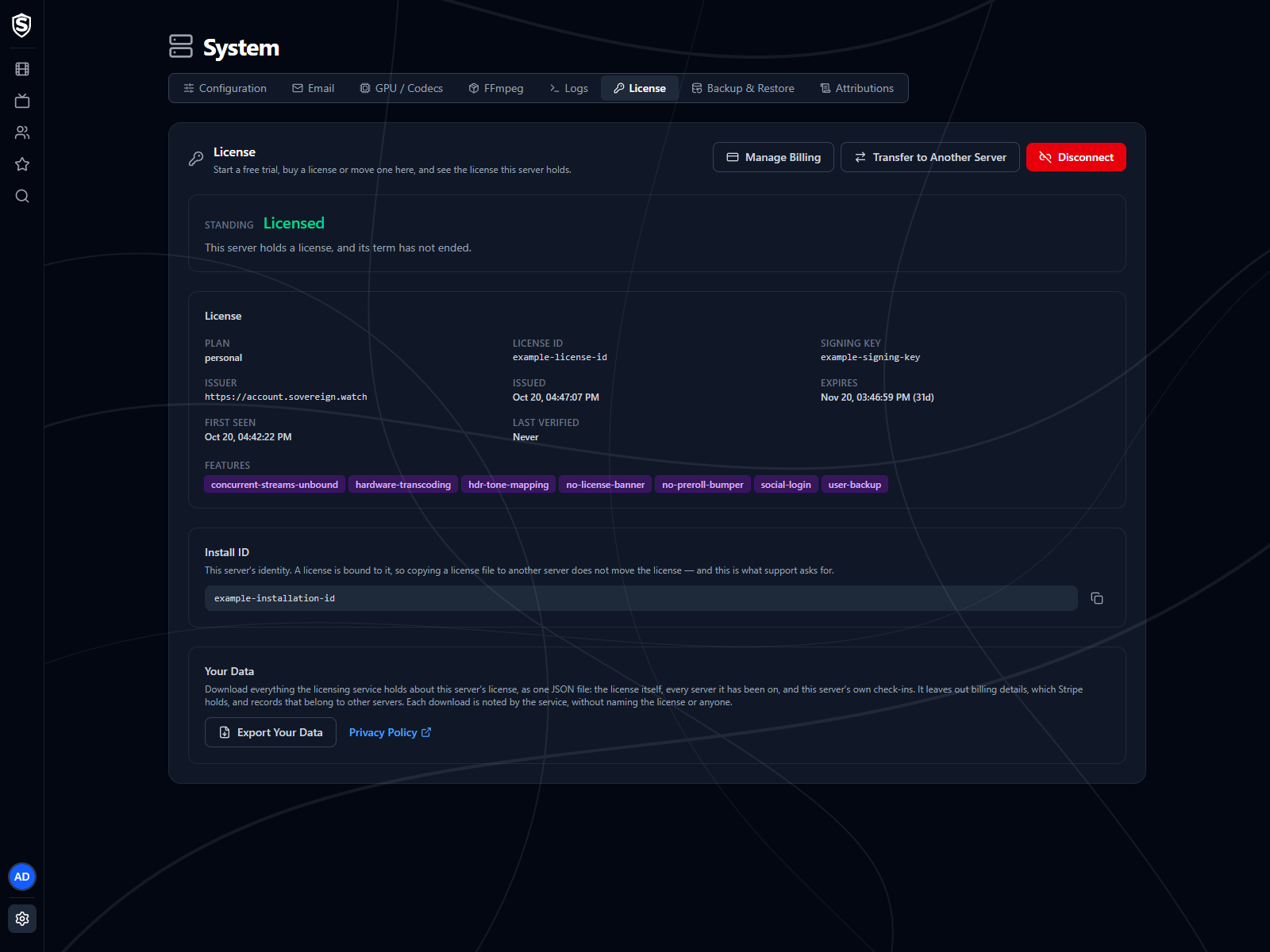
What a License Is
Section titled “What a License Is”A license is a signed statement that one particular install may run until a particular date. Your server checks the signature itself, without contacting anyone, so a server behind a firewall or with no internet connection at all stays licensed for its whole term.
A license belongs to one install, so copying the license file to another server doesn’t move it. The two are tied together by the install ID.
Unlicensed Servers
Section titled “Unlicensed Servers”A server with no license is Unlicensed from the moment it first starts, and it shows the notice straight away. There’s no countdown before it and no time limit after it. Playback, transcoding, users, metadata and every client work as they would with a license. What it can’t do is export or restore user backups, except to restore a backup made by a licensed server.
While the server is unlicensed, the License page sums this up in one sentence. From there you can start a trial, buy a license, or leave the notice in place.
Free Trials
Section titled “Free Trials”Every server can start one free trial from its License page, with no account, no payment details and no limit on viewing. It lasts 30 days from the moment you start it, and Getting a License walks through it.
A trial is one per install, ever. It’s tied to the server’s install ID, so disconnecting, updating Sovereign, recreating its container or restoring a backup doesn’t bring another one, and a trial can’t be moved to a different server.
A trial doesn’t include user backups. Everything else works as it does with a license, and when the trial ends the notice comes back. Restoring a backup made by a licensed server still works on a trial server, and replaces the trial with the license in the backup.
User Backups
Section titled “User Backups”Export Backup and Import Backup on the Backup & Restore page need a purchased license. A free trial doesn’t include them, and neither does a server whose license has expired, has moved to another server, can’t be verified, or is in use on a second server. Without that rule, a trial could be exported near its end and restored onto a fresh server, which would start another trial, over and over.
There’s one exception, for rebuilding a server. A rebuilt server has no license yet, or only a free trial you started to clear the notice while you found the backup, but it can still restore a backup made by a licensed server, because that backup carries the license and restoring it brings the license back. That works when:
- the license in the backup is a purchased one and is still in its term,
- the backup hasn’t been edited by hand since it was exported, and
- the server you’re restoring onto holds no license of its own, or only its free trial.
A trial is replaced by the license in the backup, and you lose nothing by it: the trial was free, and the server ends up on the license you bought. A purchased license is never replaced, even an expired one.
Otherwise the import is refused before anything is written, and it says why. When export isn’t available, the Backup & Restore page disables Export Backup and shows the reason beside it.
An expired license loses backups too, even a paid one. Fix the payment in Manage Billing, and backups come back when the server picks up the renewal.
What the Notice Looks Like
Section titled “What the Notice Looks Like”The notice is a bar across the top of the screen, and it says different things depending on who’s looking. While it’s showing, a ten-second video also plays at the start of each title, on the web app, the Roku channel and the Android app alike. It can be paused but not skipped, and seeking is unavailable until it ends. It plays once per viewing: resuming a title later plays it again, but seeking within a title doesn’t. On the occasional stream it can’t be added to, the title starts without it.
Administrators get the specifics and an instruction they can act on themselves: start a trial or buy a license, move a license back, update billing, or shut down a copy. Most of them name System > License, the License tab on the System page of the web app’s admin settings, as the place to do it. Viewers get one sentence saying the server has a licensing problem and to ask an administrator, and that sentence is the same whatever the underlying reason is. Someone watching a film can’t do anything about the difference between an expired license and a corrupt one, so the wording doesn’t say which it is.
Some notices arrive before anything is wrong, and only administrators see them. While the server is on a free trial, a blue notice counts down the days left for the whole 30 days, and it turns amber for the last 3. A subscription gets a notice 14 days before its term ends. Only the trial ones ask you to do something.
The subscription notice is there for information. The license your server holds ends where the billing period it was issued in ends, and when the subscription renews, the server picks up a new license for the next term by itself the next time it checks in (see Staying Connected). A server that can’t reach the licensing service doesn’t get it, and reads Expired once the old term ends, until it’s back online and checks in again.
With email configured, administrators are also told when things change for the worse: a server that had a license loses it, or more than one server turns out to be using the same license. A second message follows once the problem clears. A brand-new server starting out unlicensed sends nothing, because whoever installed it already knows.
On the web app the bar isn’t permanent during playback. It appears once when a title starts, fades out after about a minute and doesn’t come back for the rest of that viewing, so a notice you’ve already read doesn’t sit over the picture for two hours. When the short video plays, that’s the notice for that viewing, and the bar doesn’t appear over the picture at all. Only red notices appear over playback. Amber and blue ones stay in the rest of the interface. The Roku channel and the Android app never draw the bar over playback.
The wording comes from your server rather than from the app you’re reading it in, so the same message reaches the web app, the Roku channel and the Android app word for word.
License Messages
Section titled “License Messages”Every notice Sovereign can show, and what to do about each. Colour carries the urgency: red means something is wrong now, amber means a limit is close and there’s something to do before it arrives, and blue is for information only.
What an administrator sees
| Colour | Message | What it means | What to do |
|---|---|---|---|
| Red | This server is not licensed. Start a free trial or buy a license in System > License. | No license is stored. A new server starts here, and so does one that has been disconnected. | Start a free trial or buy a license, or move one here that you already own. |
| Red | This server’s license could not be verified. Fix it in System > License. | A license file is stored but doesn’t verify. It’s corrupt, altered, or newer than this server understands. | Move your license here again. If it keeps happening, check for a server update. |
| Red | This license was issued to a different server. Fix it in System > License. | The stored license names a different install ID, usually after a license file was copied between servers. | Move the license here properly, with a transfer code or the email you paid with. |
| Red | Another server has taken over this license. Move it back in System > License. | The same license was moved to a different server, which displaced this one. | Move it back if this is the server that should hold it. Each move counts against the license’s 10 server changes. |
| Red | This server’s license has expired. Buy a license or update billing in System > License. | The license is genuine and belongs to this install, but its term is over. Usually a payment failed, the subscription was cancelled, or the server couldn’t check in when it renewed. | If a payment failed, fix it in Manage Billing and the server picks up the renewal by itself. If the subscription was cancelled, buy a license. |
| Red | This server’s trial has ended. Buy a license in System > License. | The server’s free trial is genuine and belongs to this install, but its 30 days are over. | Buy a license. A trial is one per server, so another one isn’t available. |
| Red | Another server is using this license. Both servers still work. Shut down the one you do not need. | Two servers have been checking in with the same license and install identity for at least a day. Usually a copy of one server was restored onto a second machine. | Shut down whichever one shouldn’t be running, and the notice clears itself a day or two later. If both should be running, the second needs its own license. If the copy isn’t yours to shut down, see Moving and Disconnecting. |
| Blue | This server is on a free trial. N days left. Buy a license in System > License. | On a free trial, more than 3 days from its end. | Nothing yet. Buy a license whenever you’re ready, and the purchase replaces the trial straight away. The notice turns amber for the last 3 days. |
| Amber | This server’s trial ends in N days. Buy a license in System > License. | On a free trial, and within 3 days of its end. | Buy a license before it ends. The purchase replaces the trial straight away. |
| Blue | This server’s license expires in N days. It renews automatically while the subscription is active. | Within 14 days of the term ending. | Nothing. When the subscription renews, the server picks up the new term by itself within about 12 hours. If you cancelled the subscription, the notice turns red when the term ends. |
What everyone else sees
| Colour | Message | What it means | What to do |
|---|---|---|---|
| Red | This server has a licensing problem. Ask an administrator to fix it. | The server is in one of the seven red states above. | Tell whoever runs the server. Nothing on your side is restricted, and playback is unaffected. |
Viewers see the same sentence for all seven, because which one applies is a matter for whoever runs the server.
Standing
Section titled “Standing”Standing is the one-word answer to where this install stands, shown at the top of the License page.
| Standing | What it means |
|---|---|
Licensed |
Holds a paid license, term still running. Viewers see nothing; administrators see a notice in the last 14 days of the term. |
Trial |
On its free trial, term still running. Administrators see the days left; viewers see nothing. |
Unlicensed |
No license is stored. A new server starts here, and a disconnected one comes back to it. Start a trial or buy a license to remove the notice. |
Expired |
A genuine license for this install, but its term has ended. Update billing if a payment failed, or buy a license. |
Duplicate |
A genuine license, in term, but more than one server is checking in with it. The notice clears once only one is running. |
Superseded |
Another install holds this license now. Move it back to bind it to this server again. |
Wrong Install |
The stored license names a different install. Copying a license file between servers doesn’t move it; moving it does. |
Invalid |
A license is stored but doesn’t verify. It’s corrupt, altered, or minted by a newer service than this server understands. |
Unknown |
Standing couldn’t be worked out. Licensing fails open, so nothing is restricted and nothing is shown. |
Every standing except Licensed, Trial and Unknown shows the red notice. A license that can’t be verified counts the same as no license at all, and the reason is spelled out on the License page and in the startup log.
The Install ID
Section titled “The Install ID”The Install ID below the license details on the License page is this server’s identity, and it’s what a license is bound to. It’s also what support asks for.
Sovereign keeps that identity across a rebuilt database, a restored backup and a moved data directory, because losing it would leave you holding a license that names an install you no longer are. It travels inside the user backup along with the license itself, so restoring a backup restores both together, as long as nobody has edited the backup by hand.
Staying Connected
Section titled “Staying Connected”A license that verifies offline can’t notice that something changed at the licensing service, so a licensed server asks a couple of times a day whether it still holds its license, and the answer is signed the same way the license is. The result is the Last Verified time on the License page.
The same check is how a renewal arrives. Once your subscription has renewed, the answer also carries a new license for the next term, signed the same way, and the server swaps it in for the old one. Nothing needs doing on the server, and it doesn’t count as a server change. A server that can’t reach the licensing service keeps the license it has, which runs to its end date, and picks up the renewal at its first check-in once it’s back online.
Three things go out with that question. The first is the license file your server already holds, sent back unchanged to the service that signed it. The second is a random value your server invents when it starts up and keeps only in memory, which changes every time the server restarts and isn’t derived from your hardware, your library or your users. It exists so the service can tell one server checking in twice from two servers checking in as the same install. The third is the version of Sovereign the server is running.
No viewing data is sent, and there’s nothing else in the request.
The service does see the address the request comes from, as any website would. It works out the country, the region (a state or province) and whether the address belongs to a hosting provider, and it doesn’t keep the address. The first check of each day then adds your server to that day’s totals, counted by region, by hosting or not, by trial or paid, by whether it still holds its license, and by version. Those totals aren’t a location record of your server, because no location is stored against any server. They aren’t usage data either: nothing about your library, your users or what anyone watches goes into them. For the totals, the only record kept about your server itself is the last day it was counted: its install ID and a date, kept for 90 days. The random value is kept too, against your install ID along with when it was first and last seen, for 30 days after the last check that carried it, because comparing those is how two copies running at once are spotted. A server with no license, or with no internet connection, never checks in and is never counted.
Besides a renewal, three things can come back: another server has taken the license, the term has been cut short (after a refund, for example), or more than one server is checking in with this license. Any of them brings the notice back, and playback carries on as before.
That check never blocks anything. If it can’t be made, because the machine is offline or the service is unreachable, the server keeps the last answer it had and carries on. Running offline is supported: a license keeps working until the end of the term it was signed with, connected or not.
sequenceDiagram
  participant S as Sovereign server
  participant L as Licensing service

  loop A couple of times a day
    S->>L: Do I still hold this license?
    Note over S,L: Sends the license, a random<br/>value and its version
    alt Still yours
      L-->>S: Signed: still licensed
    else The subscription renewed
      L-->>S: Signed: a license for the next term
      Note over S: Swaps the new license in
    else Moved, cut short, or duplicated
      L-->>S: Signed: what changed
      Note over S: Shows the notice.<br/>Playback carries on
    else No answer
      Note over S: Keeps the last answer<br/>and carries on
    end
  end
Moving and Disconnecting
Section titled “Moving and Disconnecting”Each license allows 10 server changes in a rolling 30 days. Moving it to new hardware, or onto a rebuilt server with a new identity, spends one, and the limit is what stops two households quietly sharing one license by taking turns. A move past the limit is refused with the date the oldest change stops counting.
Moving a license to a second server takes it away from the first rather than sharing it, and the first server keeps serving everything it already had, with the notice showing, until it holds a license again. Moving a License covers both ways of doing it, and disconnecting, which deletes the license stored on a server without cancelling anything.
Restoring a backup onto a second machine is different, and it catches people out. A restore never moves a license, so you end up with two servers that have the same identity and both hold the license. It’s the usual way an accidental duplicate happens: a copy of production goes onto a staging box, the staging box gets left running, and nobody notices for months.
Once both have been checking in for a day, both read Duplicate and show the notice on every client, the original included. The notice can’t say which copy is the original, because the two are identical. Playback isn’t affected on either, but neither can use user backups while the notice shows. If the second machine is meant to be there, it needs its own license. If it isn’t, shut it down and the notice clears itself a day or two after only one copy is still running.
A copy you can’t shut down, such as one made from a leaked backup, is handled from your own server instead. Disconnect it, stop it, and delete its identity: the installation.json file in the data directory and the installation record in the ServerInstallations table of sovereign.db. Delete both, because each restores the other. Then start the server and use Move a License Here with the email you paid with. It comes up with a new install ID and the license moves to it, so the copy reads Superseded and keeps showing the notice while yours is clean. Your library, accounts and watch history aren’t touched, but the move spends one of that license’s 10 server changes.
Next Steps
Section titled “Next Steps”- Getting a License covers the free trial, buying a license and managing billing.
- Moving a License covers transfer codes, recovering a license by email, and disconnecting.
Titles, artwork, people and descriptions shown in screenshots are fictional and were created for illustration. Sovereign doesn't include or supply any media: it plays the library you bring.