
Admin: Playback Simulator
The Playback Simulator page tells you whether a device would direct play a title before anyone presses play, by working out the decision a real start would make without starting a stream.
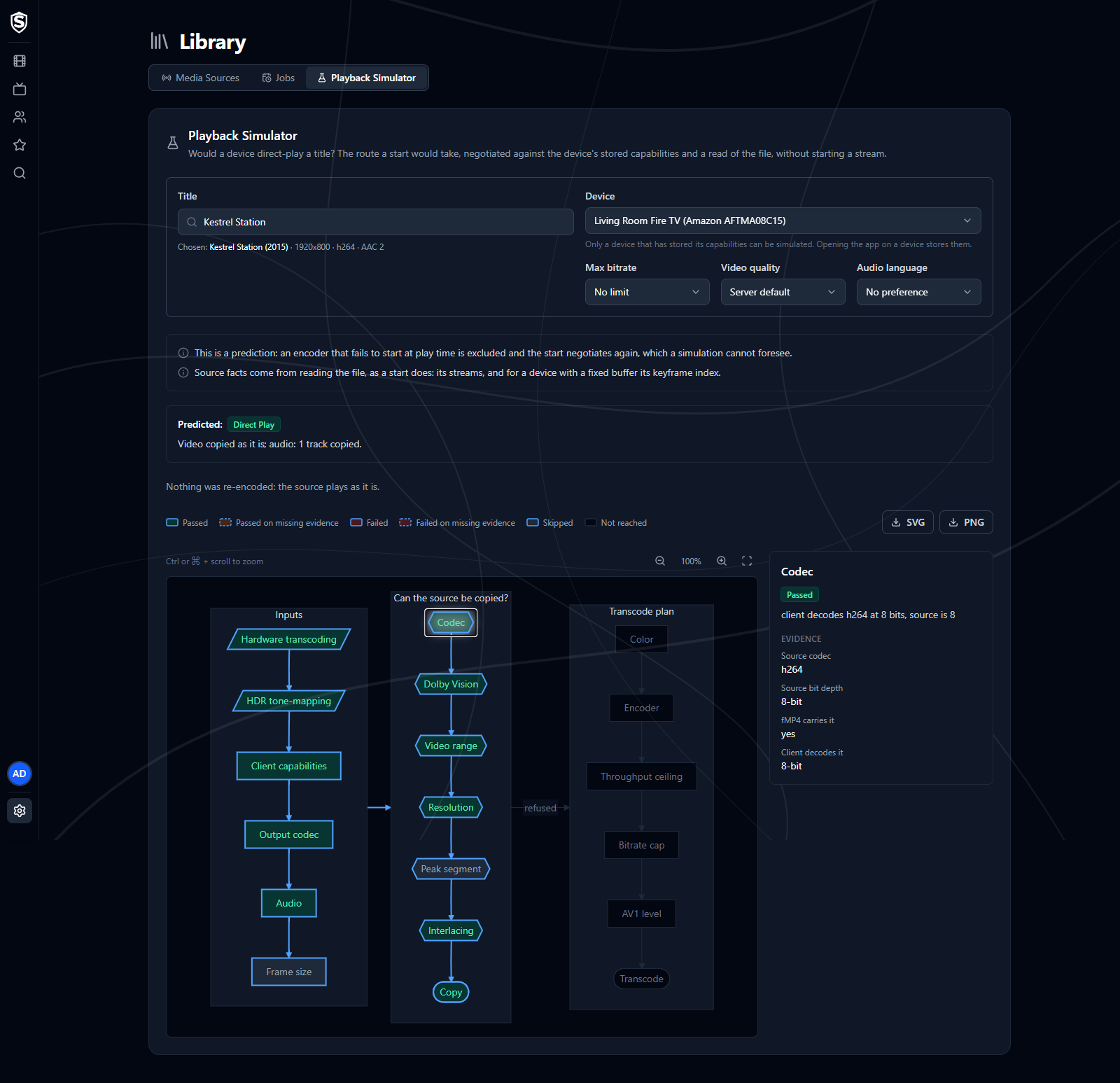
Pick what to ask about:
- Title - search for a movie or an episode and choose its file. The line under the search box shows the file you chose, with its resolution and codecs.
- Device - any device that has told the server what it can play. Opening the app on a device is what does that, so a device that’s listed under No stored capabilities needs its app opened once first.
- Max bitrate, Video quality and Audio language - optional, standing in for the viewer’s own settings. Leave them at No limit, Server default and No preference to ask about a viewer who hasn’t changed anything.
The answer updates as soon as both a title and a device are chosen, and again whenever you change one of them. It opens with a few notes on what the prediction is based on, then the headline (Predicted: and the mode, with one line on what happens to the video and audio), the reasons, and the chart of the route a start would take. Click a step in the chart to see what it compared.
The simulator reads the file the way a start would, so it works from the same facts as a real play. Playback Decisions explains how to read the chart and what the prediction can’t foresee, and Transcoding what each reason means.
Titles, artwork, people and descriptions shown in screenshots are fictional and were created for illustration. Sovereign doesn't include or supply any media: it plays the library you bring.